Posts

SharePoint 2013: Excel web access web part Errors and Resolutions

Image
If you have recently migrated from SharePoint 2010 to SharePoint 2013 or if you are configuring excel web access web part for SharePoint 2013 with named component, you might notice that you Excel web access web parts are showing some error or not showing any data even after you add your excel file location to Trusted locations in excel service application. There are multiple reasons behind this behavior of excel web access web part. If you are getting error "Workbook cannot be opened" as shown in below image, It is related to permissions to the service account used for Excel services. As all your excel files are stored in Content DB, service account used for Excel service should be having access to all respective web applications. You can use following cmdlets to get this issue resolved $webApplication = Get-SPWebApplication –Identity <URL of the Web application> $webApplication.GrantAccessToProcessIdentity("<insert service account...
How to get items from a specific SharePoint List View using client object model

Below code describes how to retrieve items from sharepoint list by specific view using client side object model Add reference “Microsoft.sharepoint.client.dll” and “Microsoft.sharepoint.client.Runtime.dll”. Write Below Code. using  Microsoft.SharePoint.Client; namespace  ConsoleApplication {        class   Program     {          static   void  main( string [] args)         {              using  ( ClientContext  ctx= new   ClientContext ( “http://siteurl” ))             {                  //Apply Credential                 ctx.Credentials =  new  System.Net....

Download Attachments From List Items In SharePoint 2013 Online Console Application

Image
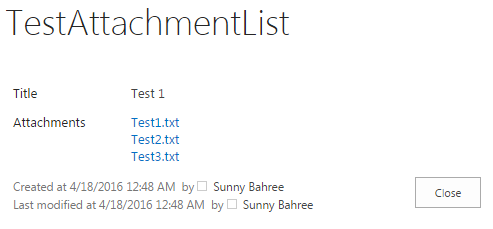
Download Attachments From List Items In SharePoint 2013 Online Console Application Introduction In this post, I will show how to connect to SharePoint 2013 Online, get the list item attachment(s) from the SharePoint 2013 Online custom list and download it to the local folder of our drive. Prerequisites The prerequisites required are: Knowledge of SharePoint Client Object Model Knowledge of C# and Console Application Reference of files i.e. "Microsoft.SharePoint.Client.dll" and "Microsoft.SharePoint.Client.Runtime.dll" in Console Application   Let's Start...   Step 1 . Create a new custom list in SharePoint 2013 Online as "TestAttachmentList" Step 2 . Add an item to a list and attach few files with it Step 3 . Just to check, view the item you have added and see if it has files attached. For example, I have created an item with "Title" as "Test 1" and have added 3 text files as shown below: ...